

■ 文字および文字列
■ 文字色、背景色、フォント、太字、イタリック、下線等 装飾
| ラベル、ボタン文字の装飾に関連した下記方法について紹介します。 ・文字色及び文字の背景色変更 ・フォント及びフォントサイズ変更 ・太字化、イタリック化、下線追加 ★ボタンの背景色も設定できます。 <Form1.h 抜粋> |
||
  private:
     System::Void button1_Click(System::Object^  sender, System::EventArgs^  e)
     {
          label1->Text = "Hello Wolrd !!";
          label1->ForeColor = Color::Blue;
          label1->BackColor = Color::Yellow;

          label1->Font = gcnew System::Drawing::Font("MS 明朝",               //字体 MS明朝
 //       label1->Font = gcnew System::Drawing::Font("MS ゴシック",           //字体 MSゴシック
                                24, FontStyle::Bold | FontStyle::Italic | FontStyle::Underline);
                            // 文字サイズ:24 太字、イタリック、下線

          button1->ForeColor =  Color::Red;               // ボタンの字の色 → 赤
          button1->BackColor = Color::LightGreen; //背景色 → 薄緑
     }
|
 |
| <プログラム例> Form1.h抜粋 |
|
        public:
                Form1(void)
                {
                        InitializeComponent();
                        String^ str1 = "年年歳歳花相似"; //文字列初期化、リテラル文字列
                        String^ str2 = "歳歳年年人不同";
                        textBox1->Text = str1;
                        textBox2->Text = str2;
                }
        private: System::
                Void button1_Click(System::Object^  sender, System::EventArgs^  e)
                {

                        String^ str3 = textBox1->Text;
                        String^ str4 = textBox2->Text;
                        textBox3->Text = str3 + " " +  str4; //文字連結
                        textBox4->Text = textBox3->Text->Length.ToString();//文字数取得
                }
|
| <実行結果> |  |
| ................... |
<プログラム例> Form1.h 抜粋 |
|
      private: System::
        Void button1_Click(System::Object^  sender, System::EventArgs^  e)
        {
                 int ix = 1234; //整数
                 int iy = 5678;
                 double PAI = 3.1416;   //浮動小数
                 double SIN60 = 0.866;

                 String^ strX = ix.ToString();
                 textBox1->Text = strX;

                 String^ strY = Convert::ToString(iy);
                 textBox2->Text = strY;

                 textBox3->Text = PAI.ToString();       //

                 textBox4->Text = Convert::ToString(SIN60);

        //       textBox4->Text = (Stirng^)PAI; //Stirng^でキャストはできない

        }
}
|
 |
■ 数値の表示
| 書式を整える関数としてString::Format( )がある | <実行結果> |
|
   <プログラム例>
#pragma once

namespace CWhiteForm {

        using namespace System;
        using namespace System::ComponentModel;
        using namespace System::Collections;
        using namespace System::Windows::Forms;
        using namespace System::Data;
        using namespace System::Drawing;

        /// <summary>
        /// Form1 の概要
        /// </summary>
        public ref class Form1 : public System::Windows::Forms::Form
        {
        public:
                Form1(void)
                {
                        InitializeComponent();
                        //
                        //TODO: ここにコンストラクター コードを追加します
                        //
                }

#pragma endregion
        private: System::Void button1_Click(System::Object^  sender, System::EventArgs^  e)
                         {
                                 //整数--------
                                 int Ix = 1234;

                                 String^ myString1 = Ix.ToString();
                                 textBox1->Text = myString1;

                                 String^ myString2 = Convert::ToString(Ix);
                                 textBox2->Text = myString2;


                                //浮動小数--------
                                 double X1 = 5678.9123;

                                 String^ myString3 = X1.ToString();
                                 textBox3->Text = myString3;

                                 String^ myString4 = Convert::ToString(X1);
                                 textBox4->Text = myString4;

                                 //整数の16進数表示
                                 int Iy = 5678;

                                 String^ myString5 = String::Format("{0}の16進数 = {1:X4}",Iy,Iy); //X:16進数
                                 textBox5->Text = myString5;

                                 String^ myString6 = Convert::ToString(Iy,16);
                                 textBox6->Text = myString6;


                                 //小数点以下2桁の浮動小数
                                 double Y1 = 234.456789;
                                 String^ myString7 = String::Format("{0} → {1:F2}",Y1,Y1);      //F2: 小数点以下2桁
                                 textBox7->Text = myString7;


                         }
.....
.....
|
 |
■ 文字列の数値化
| <プログラム例> Form1.h抜粋 |
||
   <プログラム例>
public:
    Form1(void)
    {
        InitializeComponent();

        textBox1->TextAlign = HorizontalAlignment::Right;       //文字を右端へ
        textBox2->TextAlign = HorizontalAlignment::Right;       //文字を右端へ
        textBox3->TextAlign = HorizontalAlignment::Right;       //文字を右端へ
    }

private: System::
    Void button1_Click(System::Object^  sender, System::EventArgs^  e)
    {
        double d;
        System::Windows::Forms::DialogResult ret;       //MessageBoxボタンの戻り値

        String^ str1 = textBox1->Text;
        String^ str2 = textBox2->Text;

        try                                                //
        {
            d = Convert::ToDouble(str1) + Convert::ToDouble(str2);  //文字列を実数へ変換
                                                                    //Convert::ToInt32(str)
        }
        catch(Exception^ )
        {

             ret = MessageBox::Show(
                                    "実数を入力してください",  //表示文字列
                                    "実数に変換できません",  //タイトルバー文字列
                                    MessageBoxButtons::YesNoCancel, //表示されるボタンの種類
                                    MessageBoxIcon::Information,    //表示されるアイコンの種類
                                    MessageBoxDefaultButton::Button1//(表示されるボタンのなかで)
                                                                   //デフォルト扱いボタンの指定);
              if(ret == System::Windows::Forms::DialogResult::No)Form1::Close();
                                                                    //フォームを閉じる
              else
              {
                  textBox1->Text = "";
                  textBox2->Text = "";
                  textBox3->Text = "";
                  return;
               }
          }


          textBox3->Text = d.ToString();  //文字列に変換して表示
     }
|
<数字に変換できる文字列を入れた場合>  <数字に変換できない文字列を入れた場合>  |
| 打鍵されたキーの値を読み取る例です。 ・ KeyPressイベントで検出します。 KeyDownイベントでは検出できません。 ・ KeyPreview = true; は 不要です。 |
<実行結果> |
|
   <プログラム例>

private: System::Void Form1_KeyPress(System::Object^  sender, System::Windows::Forms::KeyPressEventArgs^  e)
                         {

                                 label1->Text = String::Format("{0} = {1}","e->KeyChar",e->KeyChar);    //KeyDownはNG

                         }
        };
|
 a を打鍵の場合  shift + 5/% を打鍵の場合 |
| 打鍵された キーを判別する例です。 ・フォームのプロパティで、KeyPreview = true; が必要です。 ・KeyDownイベントで検出します。 KeyPress では検出できません。 |
<実行結果> |
|
   <プログラム例>

public:
                Form1(void)
                {
                        InitializeComponent();
                        //
                        //TODO: ここにコンストラクター コードを追加します
                        //
                         this->KeyPreview = true;
                }

                private: System::Void Form1_KeyDown(System::Object^  sender, System::Windows::Forms::KeyEventArgs^  e) //KeyPressはNG
                         {

                                switch (e->KeyCode)
                                {
                                  case Keys::Enter:
                    listBox1->Items->Add("keys.Enter"); break;    //Enterキー
                                  case Keys::A:
                    listBox1->Items->Add("Keys.A"); break;    //A
                                  case Keys::D3:
                    listBox1->Items->Add("Keys.D3"); break;   //3
                                  case Keys::NumPad3:
                    listBox1->Items->Add("Keys.NumPad3"); break;  //Numキーの3
                                  case Keys::F12:
                    listBox1->Items->Add("Keys.F12"); break;  //ファンクションキーF12
                                        default: break;

                                }

                         }
|
 |
■ 整数をASCII文字表示、16進数表示にする(C言語流)
| <実行結果> | |
|
   <プログラム例>

#pragma once

// char*型 → String^型 、 String^型 → char*型
#include <msclr\marshal.h>                      //marshal.hは グローバルスコープでインクルードのこと
#include <msclr\marshal_cppstd.h>       //marshal_cppstd.hは グローバルスコープでインクルードのこと
#include<stdio.h>
#include<string.h>        //std::string型の文字列を使う場合必要


namespace CWhiteForm {

        using namespace System;
        using namespace System::ComponentModel;
        using namespace System::Collections;
        using namespace System::Windows::Forms;
        using namespace System::Data;
        using namespace System::Drawing;

        using namespace msclr::interop; //マーシャリングメソッドをつかう場合必要
        using namespace std;    //std::string型の文字列を使用する場合必要


        /// <summary>
        /// Form1 の概要
        /// </summary>
        public ref class Form1 : public System::Windows::Forms::Form
        {
        public:
                Form1(void)
                {
                        InitializeComponent();
                        //
                        //TODO: ここにコンストラクター コードを追加します
                        //
                }


#pragma endregion
        private: System::Void button1_Click(System::Object^  sender, System::EventArgs^  e)

                         {
                        //整数の表示--------------------------------------------------------------------
                        int I1 = 65;    // 0x41;    //A
            int I2 = 66;    // 0x42;    //B
            int I3 = 67;    // 0x43;    //C


                        textBox1->Text = I1.ToString();  //整数を文字列に変換する
            textBox2->Text = I2.ToString();
            textBox3->Text = I3.ToString();


                        //ASCII文字表示--------------------------------------------------------------------
                        char ChrCode1 = (char)I1;       //整数を(ASCII)文字に変換
                        char ChrCode2 = (char)I2;
                        char ChrCode3 = (char)I3;

                        char* ptr1 = &ChrCode1; //文字のアドレスに整数のアドレスをセット
                        char* ptr2 = &ChrCode2;
                        char* ptr3 = &ChrCode3;

            String^ str1 = marshal_as<String^>( ptr1 ); //C言語文字列を C++/CLI言語の文字列(マネージ型)で初期化
                        String^ str2 = marshal_as<String^>( ptr2 );
                        String^ str3 = marshal_as<String^>( ptr3 );


                        textBox4->Text = str1;   //テキストボックスに表示
                        textBox5->Text = str2;
                        textBox6->Text = str3;


                        //16進数表示---------------------------------------------------------------------------------


            textBox7->Text = Convert::ToString(I1,16);    //整数を16進表示の文字列に変換する
            textBox8->Text = Convert::ToString(I2,16);
            textBox9->Text = Convert::ToString(I3,16);


                         }
.....
.....
|
 |
■ マーシャリング (char*型 vs String^型)
C言語文字列char*(ネイティブ型)と C++/CLI 文字列 String^(マネージ型)のマーシャリング(データ型変換)の例を紹介します。
| <プログラム例> Form1.h 抜粋 |
||
// char*型 → String^型 、 String^型 → char*型
#include <msclr\marshal.h>      //marshal.hは グローバルスコープでインクルードのこと
#include<stdio.h>

namespace マーシャリング {

        using namespace System;
        using namespace System::ComponentModel;
        using namespace System::Collections;
        using namespace System::Windows::Forms;
        using namespace System::Data;
        using namespace System::Drawing;

        using namespace msclr::interop; //マーシャリングメソッドをつかう場合必要

        public ref class Form1 : public System::Windows::Forms::Form
        {
        public:
                Form1(void)
                {
                        InitializeComponent();
                }
private: System::
                Void button1_Click(System::Object^  sender, System::EventArgs^  e)
                {
                        const char* str_char = "How are you ?"; //C言語の文字列(ネイティブ型)を宣言して、初期化
                        String^ str_managed;    //C++/CLI言語の文字列(マネージ型)を宣言
                        str_managed = marshal_as<String^>( str_char );
                                               //marshal_as()関数でネイティブ型→マネージ型へマーシャリング
                        textBox1->Text = str_managed;   //テキストボックスに表示


                        String^ str_managed2 = "I am fine.";  //C++/CLI言語の文字列(マネージ型)宣言して、初期化
                        const char* ptr;        //C言語の文字列を初期化
                        marshal_context^ mycontext = gcnew marshal_context();//コンテキストのオブジェクト生成
                        ptr = mycontext->marshal_as<const char*>(str_managed2);//ptrはC言語文字列のポインタ
                        //marshal_contex()クラスのmarshal_as()メソッドでマネージ型→ネイティブ型へマーシャリング


                        String^ str_out = marshal_as<String^>( ptr );//表示のため、ネイティブ型を再度マネージ型に変換
                        textBox2->Text = str_out;

                }
|
 |
■ マーシャリング(std::string型 vs String^型)
C++言語std::string型(ネーティブ型)と C++/CLI言語String^型(マネージ型)間のマーシャリング(データ型変換)の例を紹介します。
| |
<プログラム例> Form1.h 抜粋 |
|
// string型 → String^型 、 String^型 → string型

#include<string>        //std::string型の文字列を使う場合必要
#include <msclr\marshal_cppstd.h>
                        //marshal_cppstd.hは グローバルスコープでインクルードのこと


namespace marsharingstring {

        using namespace System;
        using namespace System::ComponentModel;
        using namespace System::Collections;
        using namespace System::Windows::Forms;
        using namespace System::Data;
        using namespace System::Drawing;

        using namespace std;    //std::string型の文字列を使用する場合必要
        using namespace msclr::interop; //マーシャリングメソッドをつかう場合必要


        public ref class Form1 : public System::Windows::Forms::Form
        {
        public:
                Form1(void)
                {
                        InitializeComponent();
                }


private: System::
                Void button1_Click(System::Object^  sender, System::EventArgs^  e)
                {
                        string Question_string = "What is this ?";

                        String^ Question_managed;    //C++/CLI言語の文字列(マネージ型)を宣言
            Question_managed = marshal_as<String^>(Question_string);
                                       //marshal_as()関数でネイティブ型→マネージ型へマーシャリング
                        textBox1->Text = Question_managed;


                         String^ Answer_managed = "It is an Apple.";
                         string Answer_string;

                         marshal_context^ mycontext = gcnew marshal_context();
                                                        //コンテキストのオブジェクト生成
                         Answer_string = mycontext->marshal_as<string>(Answer_managed);
                         String^ str_out = marshal_as<String^>(Answer_string);
                                          //表示のため、ネイティブ型を再度マネージ型に変換
                         textBox2->Text = str_out;

                }


                ~Form1()
                {
                        if (components)
                        {
                                delete components;
                        }
                }
|
 |
| <実行結果> | |
|
・C言語文字列やC++文字列をテキストボックスに記載するにはmarshal_as<String^>( )でマーシャリングして String^型に変換する。 <プログラム例>
#pragma once
// char*型 → String^型 、 String^型 → char*型
#include <msclr\marshal.h> //marshal.hは グローバルスコープでインクルードのこと
#include <msclr\marshal_cppstd.h> //marshal_cppstd.hは グローバルスコープでインクルードのこと
#include<stdio.h>
#include<string.h> //std::string型の文字列を使う場合必要
namespace CWhiteForm {
using namespace System;
using namespace System::ComponentModel;
using namespace System::Collections;
using namespace System::Windows::Forms;
using namespace System::Data;
using namespace System::Drawing;
using namespace msclr::interop; //マーシャリングメソッドをつかう場合必要
using namespace std; //std::string型の文字列を使用する場合必要
/// <summary>
/// Form1 の概要
/// </summary>
public ref class Form1 : public System::Windows::Forms::Form
{
public:
Form1(void)
{
InitializeComponent();
//
//TODO: ここにコンストラクター コードを追加します
//
}
#pragma endregion
private: System::Void button1_Click(System::Object^ sender, System::EventArgs^ e)
{
//-------------------------------------------------------------------
//C言語文字列
char* str1_c = "本日は晴天なり";
//C++文字列をテキストボックスに記載するにはmarshal_as<String^>( )でマーシャリングする
textBox1->Text = marshal_as<String^>(str1_c); //String^型に変換
//-------------------------------------------------------------------
//C++/CLI 文字列 //string は basic_stringクラスがtypedefされたものである
//C++文字列をテキストボックスに記載するにはmarshal_as<String^>でマーシャリングする
string str2_c ="ハロー World !!";
textBox2->Text = marshal_as<String^>(str2_c); //String^型に変換
//---------------------------------------------------------------------
//逆にラベル文字を ラベルの文字をstring型にするにはmarshal_as<string>で型変換する
string str3_c = marshal_as<string>(label1->Text); //string型に変換
string str4_c = "は、日本一高い山です";
string str5_c = str3_c + str4_c;
textBox3->Text = marshal_as<String^>(str5_c); //String^型に変換
}
.......
.......
|
 |
■ C言語文字列の配列化と配列のASCII文字表示と16進数表示
| C言語の文字列を配列化して、 その各配列の値を ASCII文字表示、10進数の整数表示 及び16進数表示したプログラムです。。 | |
|
   <プログラム例>

#pragma once
// char*型 → String^型 、 String^型 → char*型
#include <msclr\marshal.h>                      //marshal.hは グローバルスコープでインクルードのこと
#include <msclr\marshal_cppstd.h>       //marshal_cppstd.hは グローバルスコープでインクルードのこと
#include<stdio.h>
#include<string.h>        //std::string型の文字列を使う場合必要

namespace CWhiteForm {

        using namespace System;
        using namespace System::ComponentModel;
        using namespace System::Collections;
        using namespace System::Windows::Forms;
        using namespace System::Data;
        using namespace System::Drawing;

        using namespace msclr::interop; //マーシャリングメソッドをつかう場合必要
        using namespace std;    //std::string型の文字列を使用する場合必要


        /// <summary>
        /// Form1 の概要
        /// </summary>
        public ref class Form1 : public System::Windows::Forms::Form
        {
        public:
                Form1(void)
                {
                        InitializeComponent();
                        //
                        //TODO: ここにコンストラクター コードを追加します
                        //
                }

#pragma endregion
        private: System::Void button1_Click(System::Object^  sender, System::EventArgs^  e)
                         {
                                 int i;


                                 //---------------------------------------------------------------------------------
                                 //テキストボックス
                                 char AX[64];
                                 char* myStr = "Japan";

                                 sprintf(AX,"%s",myStr);       //文字列としてバッファーに収納

                                 array<String^>^ mAX = gcnew array<String^>(64);        //マネージ配列を定義

                                 i = 0;
                                 for each(char s in AX) //charの配列AX[64]すべてに対して実行
                                 {
                                         char ch = AX[i];
                                         char* ptr;
                                         ptr = &ch;
                                         mAX[i] = marshal_as<String^>(ptr);             //配列の値をマーシャリング
                                         i++;

                                 }


                                 textBox1->Text
                                         = String::Format("AX[0]={0}, AX[1]={1}, AX[2]={2}, AX[3]={3}, AX[4]={4}",
                                         mAX[0],mAX[1],mAX[2],mAX[3],mAX[4]);

                                //--------------------------------------------------------------------------------------
                                //リッチテキスト
                                 array<String^>^ mBX = gcnew array<String^>(64);        //アスキー文字のメモリ    //マネージ配列を定義
                                 array<String^>^ mBX16 = gcnew array<String^>(64);      //16進数のメモリ      //マネージ配列を定義

                                 char BX[64];
                                 char* myStr2 = "Hellow World !!  Today is Sunday. How are you?";
                                 sprintf(BX,"%s",myStr2);

                                 i = 0;
                                 for each(char s in BX) //charの配列BX[64]すべてに対して実行
                                 {
                                         char ch = BX[i];
                                         char* ptr;
                                         ptr = &ch;
                                         mBX[i] = marshal_as<String^>(ptr);             //配列の値をマーシャリング
                                         int Ix = (int)BX[i];
                                         mBX16[i] = Convert::ToString(Ix,16); //整数を16進表示の文字列に変換する

                                         richTextBox1->SelectedText =                   //リッチテキストに表示
                                                 String::Format("BX[{0}]:  {1},    {2}    0x{3}\r",i,mBX[i],Ix,mBX16[i]);

                                         i++;
                                 }


                         }

.......
.......
|
 |
■ String^ 文字列のByte型、Char型配列への変換と配列値の16進数表示
| String^ 文字列を マネージ型の配列 Byte型とChar型配列に変換して 16進表示したプログラムです。 結果のダイアログをみると Byte型型配列はリトルエンディアンに変換されているのがわかります。 また、サイズは Char型が2バイト、Byte型が1バイトであることが 表示されています。 |
<実行結果> |
|
   <プログラム例>
#pragma once


// char*型 → String^型 、 String^型 → char*型
#include <msclr\marshal.h>                      //marshal.hは グローバルスコープでインクルードのこと
#include <msclr\marshal_cppstd.h>       //marshal_cppstd.hは グローバルスコープでインクルードのこと
#include<stdio.h>
#include<string.h>        //std::string型の文字列を使う場合必要

namespace CWhiteForm {

        using namespace System;
        using namespace System::ComponentModel;
        using namespace System::Collections;
        using namespace System::Windows::Forms;
        using namespace System::Data;
        using namespace System::Drawing;

        using namespace msclr::interop; //マーシャリングメソッドをつかう場合必要
        using namespace std;    //std::string型の文字列を使用する場合必要


        /// <summary>
        /// Form1 の概要
        /// </summary>
        public ref class Form1 : public System::Windows::Forms::Form
        {
        public:
                Form1(void)
                {
                        InitializeComponent();
                        //
                        //TODO: ここにコンストラクター コードを追加します
                        //
                }


                }
#pragma endregion
        private: System::Void button1_Click(System::Object^  sender, System::EventArgs^  e)
                         {


                                 String^ str1 = "漢字日本語ABCDE12345";


                                 array<Char>^ ch = str1->ToCharArray();         //文字列を 文字(Char:2バイト)の配列に変換する

                                //配列中のそれぞれの要素に対して処理を行う
                                 for each(Char c in ch)                                 //c:配列の変数名  ch:配列名
                                 {
                                         richTextBox1->SelectedText = String::Format("{0}: 0x{1:X4}\r\n\n",c,(int)c);

                                 }

                                 int intSize = sizeof(Char);
                                 label5->Text = String::Format("サイズ={0}バイト",intSize.ToString());


                                 array<Byte>^ bytes = System::Text::Encoding::Unicode->GetBytes(str1);
                                 for each(Byte b in bytes)
                                 {
                                         richTextBox2->SelectedText = String::Format("{0:X}\r",b);
                                 }

                                 intSize = sizeof(Byte);
                                 label6->Text = String::Format("サイズ={0}バイト",intSize.ToString());


                         }
|
 |
■ ToCharArray( )を使わないで、String^文字列からChar型配列を取得する
| ToCharArry()を使わなくても、String^ 変数名に[ ]をつけるだけでChar型の配列が取得できます。(VC++ 2012) 以下はその例です |
|
   <プログラム例>


private: System::Void button1_Click(System::Object^  sender, System::EventArgs^  e)
                         {
                                 String^ str = textBox1->Text;

                                 richTextBox1->AppendText(String::Format("{0}\n",str[0]));
                                 richTextBox1->AppendText(String::Format("{0}\n",str[1]));
                                 richTextBox1->AppendText(String::Format("{0}\n",str[2]));
                                 richTextBox1->AppendText(String::Format("{0}\n",str[3]));


                         }
        };
|
<実行結果> |
■ 配列要素を変更後、結合して表示 // リッチテキストボックス: N行目の文字列を置換する
| 配列の要素を変更後、全配列を結合して表示する例です |
|
|
   <プログラム例>


namespace CWhiteForm {

        using namespace System;
        using namespace System::ComponentModel;
        using namespace System::Collections;
        using namespace System::Windows::Forms;
        using namespace System::Data;
        using namespace System::Drawing;

        /// <summary>
        /// Form1 の概要
        /// </summary>
        public ref class Form1 : public System::Windows::Forms::Form
        {
        public:
                Form1(void)
                {
                        InitializeComponent();
                        //
                        //TODO: ここにコンストラクター コードを追加します
                        //
                        String^ str = "000a,000b,000c\n111a,111b,111c,\n"
                                                        + "222a,222b,222c,\n333a,333b,333c,\n"
                                                          + "444a,444b,444c,\n555a,555b,555c,\n"
                                                            + "666a,666b,666c,\n777a,777b,777c,\n"
                                                                  + "888a,888b,888c,\n999a,999b,999c,\n";

                        richTextBox1->Text = str;
                }


        private: System::Void button1_Click(System::Object^  sender, System::EventArgs^  e)
                         {
                                 String^ str = richTextBox1->Text;
                                 array<String^>^ary1 = gcnew array<String^>(str->Length);
                                 ary1 = richTextBox1->Lines;//行毎に配列要素として初期化     //配列要素に\nは含まれない
                                 ary1[2] = "AAAAAA,BBBBBB,CCCCCC";

                                 richTextBox1->Text = String::Join("\n",ary1);  //配列の結合
                                 //String::Join("区切り文字", 配列名, 展開開始のインデックス, 展開する配列数)

                         }
|
|
| <実行結果> | |
<ボタン1クリック前> |
<ボタン1クリック後> |
| 文字列 "123,456,789,111,222,333,444,555,666,777,888,999"を "," 毎に また","2個毎に改行してリッチテキストボックスに表示するプログラムです。 |
|
From1.h 抜粋 <プログラム例>
pragma once
namespace CWhiteForm {
using namespace System;
using namespace System::ComponentModel;
using namespace System::Collections;
using namespace System::Windows::Forms;
using namespace System::Data;
using namespace System::Drawing;
/// <summary>
/// Form1 の概要
/// </summary>
public ref class Form1 : public System::Windows::Forms::Form
{
static String^ str = "123,456,789,111,222,333,444,555,666,777,888,999";
public:
Form1(void)
{
InitializeComponent();
richTextBox3->Text = str; //データの表示
}
private: System::Void button1_Click(System::Object^ sender, System::EventArgs^ e)
{
int itemp = 0;
String^ str1 = str;
String^ str2 = str;
while(1) // ,毎に改行
{
itemp = str1->IndexOf(',',itemp +1);
if(itemp == -1)break; //
str1 = str1->Insert(itemp +1,"\n");
}
richTextBox1->Text = str1;
itemp = 0;
while(1) // ,×2個 毎に改行
{
itemp = str2->IndexOf(',',itemp +1);
if(itemp == -1)break; //
itemp = str2->IndexOf(',',itemp +1);
if(itemp == -1)break; //
str2 = str2->Insert(itemp +1,"\n");
}
richTextBox2->Text = str2;
}
}
|
<実行結果> |
| 文字列 "123,456,789,111,222,333,444,555,666,777,888,999"を "," 毎に配列化して表示するプログラムです。 |
|
Form1.h 抜粋 <プログラム例>
#pragma once
namespace CWhiteForm {
using namespace System;
using namespace System::ComponentModel;
using namespace System::Collections;
using namespace System::Windows::Forms;
using namespace System::Data;
using namespace System::Drawing;
/// <summary>
/// Form1 の概要
/// </summary>
public ref class Form1 : public System::Windows::Forms::Form
{
static String^ str = "123,456,789,111,222,333,444,555,666,777,888,999";
public:
Form1(void)
{
InitializeComponent();
richTextBox2->Text = str;
}
private: System::Void button1_Click(System::Object^ sender, System::EventArgs^ e)
{
// カンマ区切りで分割して配列に格納する
array<String^>^Data = str->Split(',');
int i = 0;
for each (String^ t in Data)
{
listBox1->Items->Add(t); //リストボックスへのアイテムに追加
i++;
}
String^ tempStr ;
i = 0;
for each (String^ t in Data)
{
tempStr = String::Format("Data[{0}] = {1}",i,t);
listBox2->Items->Insert(i,tempStr); //リストボックスへのアイテムに追加
i++;
}
int Num = Data->Length; //配列の要素数取得
textBox1->Text = Num.ToString();
//i = 0;
for(i = 0; i < Num; i++)
{
tempStr = String::Format("Data[{0}] = {1}\n",i,Data[i]);
richTextBox1->SelectedText = tempStr; //リッチテキストボックスへの行追加
}
}
}
|
<実行結果> |
| キーボードからテキストボックスに入力された文字の文字コードを、以下の要領で表示するプログラムです。 ① 入力文字に対して、Windowsにより求められたシフトJIS文字コード ② ①のシフトJIS文字コードを 所要の変換式により変換したJIS漢字コード(JIS X 2013) ③ ②のJIS漢字コードを 所要の変換式により再変換したシフトJISコード (注) ・JIS漢字コード(JIS X 2013)には、すべて2バイト文字である。 シフトJISの1バイト文字(いわゆるASCII文字、ANK文字)に対応するJIS漢字コードはない。 ・JIS漢字コードの中に いわゆるASCII文字、ANK文字に相当する文字はあるが通常シフトJISのASCII文字、ANK文字と対応するとはみなさない。 ・JIS漢字(JIS X 2013)は文字集合であり、実際にインターネット、PC等で使用される時は 下記の文字符号化方式で使用される。 1. ISO-2022-JP-2004 2. Shift_JIS-2004 3. EUC-JIS-2004 4. UTF-8 ・ ISO-2022-JPは 1バイト文字集合(ASCII文字:0x20~0x7F)と2バイト文字集合(JIS漢字:0x2121~0x747e)を切り替えて使用する文字符号化方式である。 ・ シフトJISは 1バイト文字集合(ANK文字:0x20~0x7f、0xA0~0xDF(カタカナ)) と2バイト文字集合(0x2121~0x747eのJIS漢字を所要の算術式によりシフト させた文字集合)を切り替えて使用する文字符号化方式である。 |
||||||||||||||||||
|
   <プログラム例>


        private: System::Void button1_Click(System::Object^  sender, System::EventArgs^  e)
                         {

                                array <Byte>^ mBytesArry = gcnew array<Byte>(2);        //マネージ形式の配列の宣言
                                Encoding^ encSjis = Encoding::GetEncoding("shift-jis");   //シフトJISのエンコードクラスを宣言 & インスタンス生成
                                String^ myStr;  //キー入力文字
                                String^ myStr1;

                                String^ str = textBox1->Text;   //テキストボックスの文字列取得

                                unsigned char* ptr0;
                                unsigned char* ptr1;
                                unsigned char BytesArry[2];


                                int ix = 0;

                                for each (int n in str)         //全配列に対して 以下を実行
                                {

                                        listBox1->Items->Insert(ix,str[ix].ToString());                 //配列化して表示


                                        mBytesArry = encSjis->GetBytes(str[ix].ToString()); //'送信文字をunicode→Shift-jisに変換してをByte配列に格納


                                        try     //2バイト文字の場合
                                        {
                                                //シフトJIS漢字
                                                sjKanji[ix] = (unsigned int)((mBytesArry[0] << 8) + mBytesArry[1] );    //シフトJIS
                                                                                                                                //bytesArry[0]:上位バイト、bytesArry[1]:下位バイト
                                                myStr = String::Format("0x{0}, 0x{1}",
                                                        Convert::ToString(mBytesArry[0],16),Convert::ToString(mBytesArry[1],16));//16進数表示
                                                listBox2->Items->Insert(ix,myStr);      //シフトJIS        16進数表示
                                        //      listBox2->Items->Insert(ix,BitConverter::ToString(bytesArry));  //こちらでも16進数表示ができる


                                                listBox3->Items->Insert(ix,sjKanji[ix]);        //シフトJIS漢字整数表示


                                                //シフトJIS漢字 → JIS漢字への変換
                                                BytesArry[0] = (unsigned char)mBytesArry[0];
                                                BytesArry[1] = (unsigned char)mBytesArry[1];

                                                ptr0 = &BytesArry[0];
                                                ptr1 = &BytesArry[1];

                                                sJIS_to_JIS_ptr(ptr0,ptr1);     //ポインタ渡し  シフトJIS漢字 → JIS漢字
                                                myStr1 = String::Format("0x{0}, 0x{1}",
                                                                Convert::ToString(*ptr0,16),Convert::ToString(*ptr1,16));
                                                listBox4->Items->Insert(ix,myStr1);     //JIS漢字16進数表示

                                                jKanji[ix] = (*ptr0 << 8) + *ptr1;
                                                listBox5->Items->Insert(ix,jKanji[ix]); //JIS漢字整数表示

                                                //JIS漢字からシフトJIS漢字への再変換
                                                JIS_to_sJIS_ptr(ptr0,ptr1);     //ポインタ渡し
                                                myStr1 = String::Format("0x{0}, 0x{1}",
                                                                Convert::ToString(*ptr0,16),Convert::ToString(*ptr1,16));
                                                listBox6->Items->Insert(ix,myStr1);     //JIS漢字16進数表示

                                                sjKanji2[ix] = (*ptr0 << 8) + *ptr1;
                                                listBox7->Items->Insert(ix,sjKanji2[ix]);       //JIS漢字整数表示

                                        }
                                        catch(Exception^ )      //1バイト文字の場合
                                        {
                                                sjKanji[ix] = (unsigned int)mBytesArry[0];
                                                myStr = String::Format("0x{0}",Convert::ToString(mBytesArry[0],16));    //16進数表示
                                                listBox2->Items->Insert(ix,myStr);      //シフトJIS        16進数表示
                                                listBox3->Items->Insert(ix,sjKanji[ix]);        //シフトJIS 整数表示

                                                listBox4->Items->Insert(ix,"コードなし");
                                                listBox5->Items->Insert(ix,"コードなし");    //JIS漢字整数表示

                                                listBox6->Items->Insert(ix,myStr);      //シフトJIS        16進数表示
                                                listBox7->Items->Insert(ix,sjKanji[ix]);        //シフトJIS 整数表示


                                        }

                                        ix++;

                                }


                        }


        private: System::Void button2_Click(System::Object^  sender, System::EventArgs^  e)
                         {

                                textBox1->ResetText();  //テキストボックス クリア

                                listBox1->Items->Clear();       //リストボックス1 クリア
                                listBox2->Items->Clear();       //リストボックス2 クリア
                                listBox3->Items->Clear();       //リストボックス1 クリア
                                listBox4->Items->Clear();       //リストボックス2 クリア
                                listBox5->Items->Clear();       //リストボックス2 クリア
                                listBox6->Items->Clear();       //リストボックス2 クリア
                                listBox7->Items->Clear();       //リストボックス2 クリア
                         }

        //シフトJIS漢字 → JIS漢字 変換
        private: void sJIS_to_JIS_ptr(unsigned char* pHi,unsigned char* pLow)
                         {

                                unsigned int temp = 0;


                                if(*pHi >= 0xa0)*pHi = *pHi -  0xc1;
                                else *pHi = *pHi - 0x81;

                                if(*pLow >= 0x9f)
                                {
                                        temp = (*pHi << 9) + 0x2200;
                                        temp = (temp | *pLow) - 0x7e;
                                }
                                else
                                {
                                        temp = (*pHi << 9) + 0x2100;
                                        if(*pLow <= 0x7e)temp = (temp | *pLow) - 0x1f;
                                        else temp = (temp | *pLow) - 0x20;
                                }


                                *pHi = (temp >> 8) & 0xff;
                                *pLow = temp & 0x00ff;

                         }

//JIS漢字 →  シフトJIS漢字 変換
        private: void JIS_to_sJIS_ptr(unsigned char* pHi,unsigned char* pLow)
                         {
                                 if(*pHi & 1)   //LSB = 1の場合
                                 {
                                         if(*pLow < 0x60)*pLow = *pLow + 0x1f;
                                         else *pLow = *pLow + 0x20;
                                 }
                                 else *pLow = *pLow + 0x7e;             //LSB = 1の場合

                                 *pHi = ((*pHi - 0x21) >> 1) + 0x81;
                                 if(*pHi > 0x9f) *pHi = *pHi + 0x40;

                         }
|
||||||||||||||||||
<実行結果> |
||||||||||||||||||
|
■ ユニコード、JIS漢字コード 及びシフトJISコードから 文字を表示する
|
||||||||||||||||||
■ 配列: String^文字列から、ユニコード、JIS漢字 及びシフトJISのバイト配列をつくる
配列: ユニコード、JIS漢字 及びシフトJISのバイト配列からString^文字列をつくる
| 以下のプログラムです ・ String^文字列から、ユニコード、JIS漢字 及びシフトJISのバイト配列をつくる ・ ユニコード、JIS漢字 及びシフトJISのバイト配列からString^文字列をつくる |
|
   <プログラム例>


namespace CWhiteForm {

        using namespace System;
        using namespace System::ComponentModel;
        using namespace System::Collections;
        using namespace System::Windows::Forms;
        using namespace System::Data;
        using namespace System::Drawing;

        using namespace System::Text;   //Encodingに必須

        /// <summary>
        /// Form1 の概要
        /// </summary>
        public ref class Form1 : public System::Windows::Forms::Form
        {
        public:
                Form1(void)
                {
                        InitializeComponent();
                        //
                        //TODO: ここにコンストラクター コードを追加します
                        //
                }


        private: System::Void button1_Click(System::Object^  sender, System::EventArgs^  e) //Unicode
                         {
                                String^ str1 = "古池や";
                                Encoding^ uniEnc = Encoding::GetEncoding("Unicode");
                                array<Byte>^ ary1 = uniEnc->GetBytes(str1);             //ユニコードのバイト配列に変換

                                String^ str2 = Encoding::GetEncoding("Unicode")->GetString(ary1);       //ユニコードの配列をユニコードのString^文字列に変換

                                richTextBox1->Text = str2;


                         }

        private: System::Void button2_Click(System::Object^  sender, System::EventArgs^  e)//JIS漢字code
                         {

                                String^ str1 = "\n蛙飛び込む";

                                Encoding^ jisEnc = Encoding::GetEncoding("iso-2022-jp");
                                array<Byte>^ ary1 = jisEnc->GetBytes(str1);             //JIS漢字コードのバイト配列に変換

                                String^ str2 = Encoding::GetEncoding("iso-2022-jp")->GetString(ary1);   //JIS漢字の配列をユニコードのSring^文字列に変換

                                richTextBox1->AppendText(str2);
                         }


private: System::Void button3_Click(System::Object^  sender, System::EventArgs^  e) //シフトJIS
                 {

                         String^ str1 = "\n水の音";

                        Encoding^ sjisEnc = Encoding::GetEncoding("Shift_JIS");
                        array<Byte>^ bytes = sjisEnc->GetBytes(str1);   //シフトJISのバイト配列に変換

                        String^ str2 = Encoding::GetEncoding("Shift_JIS")->GetString(bytes);    //シフトJISの配列をユニコードのString^文字列に変換

                        richTextBox1->AppendText(str2);

                 }

private: System::Void button4_Click(System::Object^  sender, System::EventArgs^  e)             //クリア
                 {
                         richTextBox1->Clear();
                 }
|
<実行結果> |
| 正規表現を使って、ソースコードから 16進数表示部(0xXX)をフィルタリングして摘出したプログラムです。 | |
|
 Form1.h 抜粋

 <プログラム例>
#pragma once

namespace CWhiteForm {

        using namespace System;
        using namespace System::ComponentModel;
        using namespace System::Collections;
        using namespace System::Windows::Forms;
        using namespace System::Data;
        using namespace System::Drawing;
        using namespace System::Text::RegularExpressions;       //正規表現使用のため追加

        /// <summary>
        /// Form1 の概要
        /// </summary>
        public ref class Form1 : public System::Windows::Forms::Form
        {
        public:
                Form1(void)
                {
                        InitializeComponent();
                        //
                        //TODO: ここにコンストラクター コードを追加します
                        //
                }


        private: System::Void button1_Click(System::Object^  sender, System::EventArgs^  e)
                         {
                                  // OpenFileDialog の新しいインスタンスを生成する (デザイナから追加している場合は必要ない)
                                        OpenFileDialog^ openFileDialog1 = gcnew OpenFileDialog();//new OpenFileDialog();

                                        // ダイアログのタイトルを設定する
                                        openFileDialog1->Title = "ダイアログのタイトルをココに書く";

                                        // 初期表示するディレクトリを設定するgc
                                        openFileDialog1->InitialDirectory = "c:\\";


                                        // 初期表示するファイル名を設定する
                                        openFileDialog1->FileName = "初期表示するファイル名をココに書く";

                                        // ファイルのフィルタを設定する
                                        openFileDialog1->Filter = "テキスト ファイル|*.txt;*.log|すべてのファイル|*.*";

                                        // ファイルの種類 の初期設定を 2 番目に設定する (初期値 1)
                                        openFileDialog1->FilterIndex = 2;

                                        // ダイアログボックスを閉じる前に現在のディレクトリを復元する (初期値 false)
                                        openFileDialog1->RestoreDirectory = true;

                                        // 複数のファイルを選択可能にする (初期値 false)
                                        openFileDialog1->Multiselect = true;

                                        // [ヘルプ] ボタンを表示する (初期値 false)
                                        openFileDialog1->ShowHelp = true;

                                        // [読み取り専用] チェックボックスを表示する (初期値 false)
                                        openFileDialog1->ShowReadOnly = true;

                                        // [読み取り専用] チェックボックスをオンにする (初期値 false)
                                        openFileDialog1->ReadOnlyChecked = true;

                                        // 存在しないファイルを指定した場合は警告を表示する (初期値 true)
                                        openFileDialog1->CheckFileExists = true;

                                        // 存在しないパスを指定した場合は警告を表示する (初期値 true)
                                        openFileDialog1->CheckPathExists = true;

                                        // 拡張子を指定しない場合は自動的に拡張子を付加する (初期値 true)
                                        openFileDialog1->AddExtension = true;

                                        // 有効な Win32 ファイル名だけを受け入れるようにする (初期値 true)
                                        openFileDialog1->ValidateNames = true;

                                        // ダイアログを表示し、戻り値が [OK] の場合は、選択したファイルを表示する
                                        if (openFileDialog1->ShowDialog() == System::Windows::Forms::DialogResult::OK)
                                        {

                                                // StreamReader の新しいインスタンスを生成する
                                                System::IO::StreamReader^ cReader = (

                                                gcnew System::IO::StreamReader(openFileDialog1->FileName, System::Text::Encoding::Default)
                                                );

                                                // ファイルの最後まで読み込む
                                                String^ stBuffer = cReader->ReadToEnd();

                                                // cReader を閉じる (正しくは オブジェクトの破棄を保証する を参照)
                                                cReader->Close();

                                                richTextBox1->Text = stBuffer;

                                                String^ str = openFileDialog1->FileName;        //ダイアログのタイトルをフルパスのファイル名に変更
                                                this -> Text = str;

                                                // 不要になった時点で破棄する (正しくは オブジェクトの破棄を保証する を参照)
                                                delete openFileDialog1; //      左記コードはコンパイラNG:openFileDialog1->Dispose();

                                        }
                         }
        private: System::Void button2_Click(System::Object^  sender, System::EventArgs^  e)
                         {


                                //空行は残した場合

                                Regex^ re = gcnew Regex("\\{(?<moji>[0-9A-Fa-fx\\r\\s,]+)\\}");

                                String^ st = re->Match(richTextBox1->Text)->Result("${moji}")->TrimStart()->TrimEnd();

                                richTextBox2->Text = st;


                                ////空行を残さない場合
                                ////"{"から"}"までの間を丸ごと抜き出す//"0x[0-9a-fA-F][0-9a-fA-F],"または"\r\n"の1回以上の繰り返しがあって、"{"から始まって"}"で終わるまでの間
                                //Regex^ r = gcnew Regex("0x[0-9a-fA-F][0-9a-fA-F],( |\r\n)", System::Text::RegularExpressions::RegexOptions::IgnoreCase);
                                //Match^ m = r->Match(richTextBox1->Text);
                                //richTextBox1->Text = String::Empty;
                                //while (m->Success)
                                //{
                                //      richTextBox1->Text += m->Value;
                                //      m = m->NextMatch();
                                //}


                         }
private: System::Void button3_Click(System::Object^  sender, System::EventArgs^  e)
                 {

                         String^ str = richTextBox2->Text;

            richTextBox2->Clear();


            str = str->Replace("\n", "");    //改行コード削除

            str = str->Replace(" ", "");     //空白削除

            str = str->Replace("\t", "");    //水平タブキー削除


                        richTextBox2->Text = str;


                 }
};
}
|
|
<実行結果>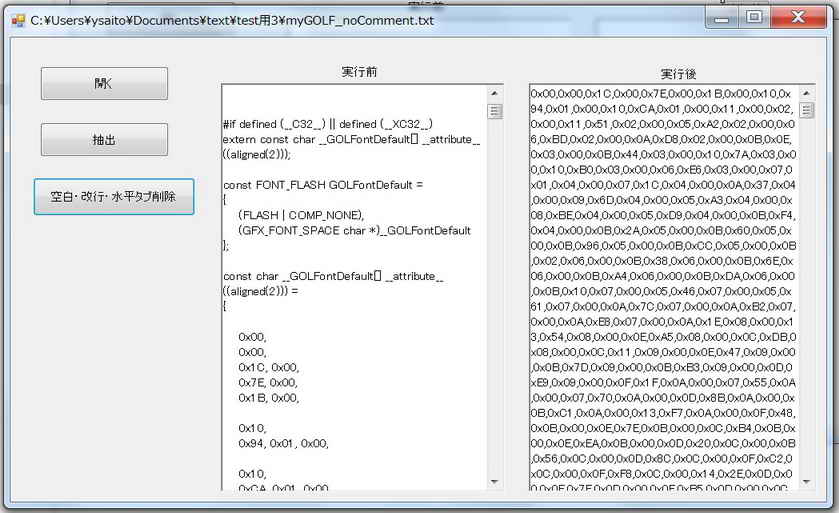 |
   <プログラム例>


main()
{

}


